






























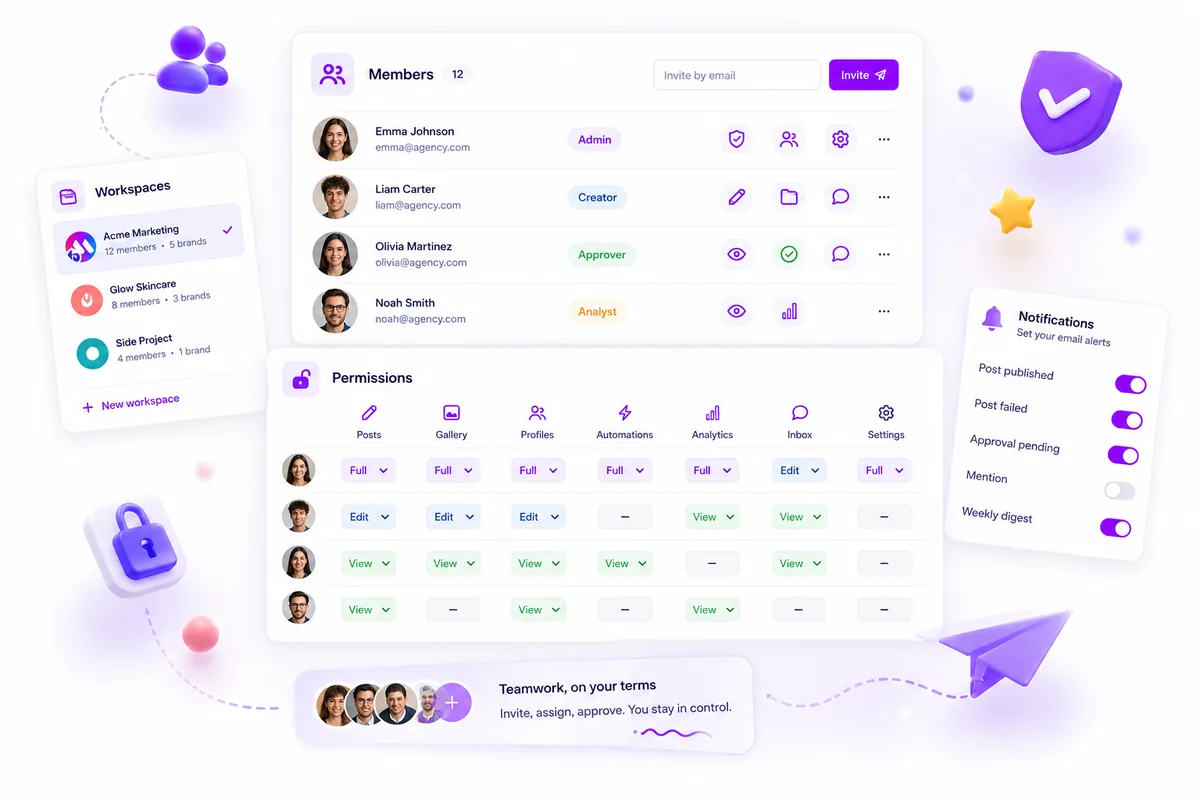
When you manage fifty brands across twenty platforms, "Editor" and "Viewer" roles are not just too limited, they are a real liability. To scale, you have to stop managing people and start managing action-based access.
We get it. You are caught between the need for speed and the constant, low-level worry that one wrong post, deleted asset or unauthorised reply could cost you a client. The work is messy by nature, and permissions should not be the bottleneck that makes it messier. Most tools push you into a "Role Bloat" trap: you pay for higher tiers that just add more complicated, unmanageable silos, instead of fixing the real issue of permission granularity.
Operator rule: If your tool makes you give someone the "Admin" role just so they can approve a single post, your security model is broken.
Mydrop pricing check, September 2026: the entry paid plans of the eight tools most often compared with Mydrop run from $6 per channel (Buffer) and $25 a month (Later) to $99 per user (Hootsuite) and $79 per seat (Sprout Social), read on each vendor's pricing page. Mydrop is free to start, then $19 a month flat, not per seat. Full table on Mydrop's compare pages.
What the best tools need to handle

For every team member, you should be able to answer one simple question: "Which specific actions can they perform on this specific resource?"
If you are stuck with a fixed, top-down hierarchy (Owner, Admin, Editor, Contributor), you are already losing. You end up with "permission creep": people get broader access than they need, just to keep the work moving.
The alternative is the Resource-Action Map. It moves away from job titles and towards how work really happens.
The Permission Audit Scorecard
Use this scorecard to test whether your current tool really supports granular control, or just hides the complexity.
| Evaluation Criteria | High-Flexibility (Target) | Rigid (Broken) |
|---|---|---|
| Scope | Per-resource (e.g., specific folder or post type) | Global role only |
| Granularity | Action-specific (e.g., Can read, but not delete) | All-or-nothing (e.g., Can delete) |
| Setup Effort | Low (Template-based invites) | High (Manual mapping per user) |
| Security Risk | Low (Least-privilege by default) | High (Over-privileged by default) |
Decision Rule: If you cannot let someone create and read a draft post without also giving them the power to approve it, your tool is a bottleneck.
At Mydrop, we built our permission model around this idea. Teams managing hundreds of brand profiles were not struggling because their people lacked talent. They were struggling because their tools squeezed everyone into one-size-fits-all roles, which piled up coordination debt.
Instead of making you choose between speed and security, we treat the member-document as a flexible map of resources and actions. You can build tailored access for each client or teammate without reworking your whole account structure. The aim is for the tool to disappear into your workflow, so your team can move fast without worrying about breaking something important.
Where basic tools start to break

When your agency manages fifty brands across twenty platforms, the traditional "Admin-Editor-Viewer" hierarchy is not just inefficient. It is a full-blown liability. You have probably seen it first-hand: a client wants a junior designer to upload images but not publish them. Or a legal reviewer needs to read posts but must be strictly blocked from the inbox.
Basic tools make you hack these needs together. You make the designer an "Admin" just so they can reach the media library, then hope they do not delete a campaign by accident. This is the Role Bloat Trap. You are not managing security, you are managing a spreadsheet of workarounds.
When the permission model is rigid, your team's workflow gets brittle. You end up with silos where people have more access than they need or, worse, cannot get their work done without pinging a real Admin for every trivial change. That creates the silent killer of agency productivity: coordination debt. Every Slack message asking for a password, an approval or an access change is a small failure of your software stack.
Decision check: If your team spends more than ten minutes a week talking about "who has access to what", your tool's permission setup is costing you money.
The buying criteria that matter
Stop asking vendors whether they have "custom roles". Of course they do. Ask this instead: "Does your permission model let me map specific actions to specific resources for any user?"
You need a system that treats every part of the application as an independent resource with its own set of permitted actions: posts, galleries, inbox threads, analytics and automations. It is the only way to scale without giving up governance.
Use this scorecard to evaluate your next platform. If a tool does not hit these marks, you are just buying another year of manual overhead.
| Criteria | Why it matters for scaling | Red flag to avoid |
|---|---|---|
| Granularity | Lets you block delete on posts while allowing create and read. |
Only offers global "Editor" or "Contributor" tiers. |
| Per-Resource Scope | Gives clients their own access, so they only see their brand's assets. | All-or-nothing access to the entire workspace. |
| Action Mapping | Separates "roles" from "permissions" completely. | Rigid role enums that you cannot modify. |
| Auditability | Makes it clear exactly who can perform sensitive actions. | No clear "Who can do what" overview for a specific user. |
At Mydrop, we dropped hard-coded roles entirely. We use a flexible member-document resource/action map, so you are not stuck with "Roles". You simply define what a person can do, whether they are an agency teammate, a freelance contractor or a client stakeholder. You set the permissions and the system enforces them at the API level. It is the difference between forcing a square peg into a round hole and starting with a peg that is already square.
The goal is not to add more complicated roles. It is to make roles irrelevant. You want a system that understands the nuance of your agency's real work, not one that makes you fit its limited, built-in idea of a "user".
How Mydrop supports this workflow
At Mydrop, we see permissions not as a rigid hierarchy, like a ladder where you are stuck on one rung, but as a fluid, action-based map. We designed the platform to treat every teammate's access as a unique, configurable object, so you decide exactly who can touch what.
Instead of forcing a client manager into a predefined "Guest" role that never quite fits, you open their member document and adjust their resource/action map. Need that client to approve posts but stay out of your internal analytics? Set the access key for posts:approve to true and leave analytics:read as false.
It is about removing the friction of "access requests" that slows your agency down. By defining permissions at resource level, covering posts, gallery assets, inbox threads and automations, you keep governance without turning your workspace into a bureaucratic maze. When you bring on a new client or move into a new project phase, you do not re-configure global roles. You apply the right permission template and your team is ready to go.
Workflow check: If a new team member has to ask you for access more than once, your permission structure is too broad. It should be defined by the resource, not by their job title.
A simple shortlist checklist
Before you commit to a platform, run this quick audit against your current bottlenecks. If a tool fails these three tests, it will probably become another source of coordination debt within six months.
| Decision Criteria | Goal | The "Red Flag" Answer |
|---|---|---|
| Granularity | Can you restrict actions per resource (e.g., only approve posts for Client X)? | "We only support broad roles (Admin/Editor)." |
| Bespoke Access | Can you set unique permissions for one user without affecting others? | "Everyone with the 'Editor' role gets the same access." |
| Visibility Control | Can you hide specific resources (like internal notes or budgets) from clients? | "All workspace members see all workspace resources." |
The "Permission Bloat" Audit Checklist
Before you invite your next stakeholder, check their access against this simple list to avoid over-privileged accounts:
- Scope Check: Does this user actually need workspace-wide access, or just one brand's folder?
- Action Check: Can they
createa post but notapproveit? (The classic "draft-only" safety valve.) - Notification Check: Have you switched off alerts for workflows they do not manage?
- Lifecycle Check: Is there a set date for revoking or reviewing this user's access?
Conclusion
The messy truth of agency life is that the "perfect" structure for a fast-moving team keeps changing. Your tools should be flexible enough to cope with that mess, not so rigid that they crack under a dozen client campaigns running at once. Stop managing people through global roles that never quite fit, and start managing actions through granular, per-resource control. When you focus on the work being done rather than the hierarchy, you stop being a gatekeeper and become an enabler for the talent you hired.


 Google review
 Trustpilot review
 Product Hunt comment





