
















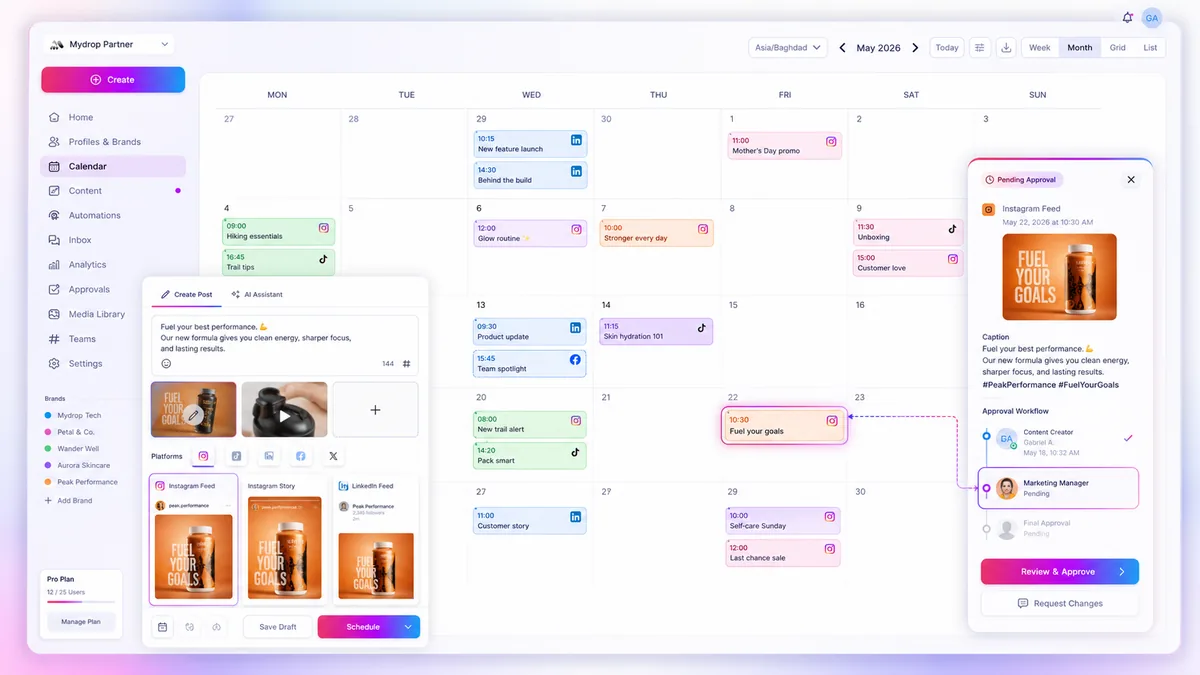
Turning your distribution process into a single, rock-solid source of truth is the only way to clear the coordination debt that holds back high-volume social teams. If your brand is juggling dozens of channels across several markets, the gap between clicking approve and checking the live post is exactly where campaign ROI goes to die.
We get it. You are stuck managing a dizzying mix of creative assets, compliance hurdles and manual tasks. It probably feels like you spend your life fighting platform bugs or chasing stakeholders at 6pm just to get a simple update live. That is not just exhausting, it is a structural failure. When your team treats publishing as a series of disconnected manual errands rather than a hardened deployment cycle, errors like broken links, missing thumbnails or botched timezone conversions are inevitable.
Operator rule: A social post is not "finished" until the platform has confirmed receipt and your system has reconciled that state. Everything else is just a draft.
Mydrop data, September 2026: in the 30 days to 16 September 2026, 98.5% of posts published through Mydrop went live at the first attempt. The most common warning was a YouTube custom thumbnail rejected because the channel was not phone-verified; the most common hard failure was an expired platform connection. Method in the Mydrop social media benchmarks.
What the best tools need to handle

The most common mistake we see across hundreds of brand profiles is using tools that are brilliant in the creative phase but go dark the moment the clock hits zero. Enterprise teams need more than a simple scheduler. They need infrastructure that treats every post as a living object that tracks its own lifecycle.
If you are weighing up your current setup, look for these baseline requirements. They are what separates professional-grade tools from those built for single-creator workflows.
| Capability | Why it matters | Enterprise Risk |
|---|---|---|
| Canonical Status | Ensures the post record matches the live reality. | Ghost posts that show as "scheduled" but failed to trigger. |
| Asynchronous Reconciliation | Automatically catches platform-side warning signals. | "Successful" posts that are actually blocked or restricted. |
| Atomic Deletion | Wipes the job from the queue and the platform. | Orphaned posts lingering in platform buffers after cancellation. |
| Schema Enforcement | Validates media constraints per channel before entry. | Massive rework cycles after an audit catches format mismatches. |
At Mydrop, we built our canonical post model around these realities. We do not just fire off a request and hope for the best. When you schedule a post, our Cloud Scheduler creates a durable job that stays tethered to your central post document. If a platform throws a quota error or a media constraint flag, the system doesn't just swallow the failure. It updates your state to warning or failed, triggers a notification and logs the specific error info, so you are not left guessing why your video never hit the feed.
The best tools prioritise visibility over velocity. When you know exactly where a post sits in its journey, whether it is waiting, pending, posted or caught in an API rate-limit loop, you stop playing detective and start managing your strategy. You need a system that acts as an extension of your operations, handling the "last mile" of delivery so your team can focus on the next big creative push.
Where basic tools start to break

Most entry-level social schedulers treat every post like a solitary event. You draft, you pick a time, it fires. But when your team manages dozens of profiles across three time zones, this isolated approach creates what we call "synchronisation decay." You end up with a pile of fragmented tasks that lose contact with reality the moment they leave your dashboard.
The cracks start to show in three specific ways:
- The Status Black Hole: You see "scheduled" in your tool, but the platform API returns a silent error because your auth token expired or your media format triggered an edge-case rejection. Your tool keeps showing a green tick, while your live profile stays empty.
- Approval Drift: When the approval process lives in a separate tool, or worse, an email thread, the version of the post that gets approved often isn't the version that gets uploaded. You are essentially playing a high-stakes game of telephone with your own content calendar.
- Provider-Side Asynchronicity: Networks like LinkedIn or TikTok don't always give you a "yes/no" answer instantly. They might return a "warning" or a partial failure, like a missing thumbnail on a video. Basic schedulers often treat these as full successes, forcing your team to manually check every single link, comment and asset long after the fact.
At Mydrop, we see this across hundreds of brand profiles: the more you scale, the less "scheduling" matters and the more "state management" becomes the real job. If your system doesn't know exactly what the platform sees, you are flying blind.
The buying criteria that matter
When you are ready to move beyond basic tools, stop looking for more features and start looking for architectural integrity. You need a platform that treats your content calendar as a live, observable system rather than a static to-do list.
Use this scorecard to work out whether a tool can handle the load of a serious marketing operation.
| Evaluation Metric | The "Static" Failure Mode | The Enterprise Standard |
|---|---|---|
| State Reconciliation | Assumes success if no immediate error. | Auto-verifies status via platform API post-publish. |
| Asset Hardening | Allows mismatched media formats. | Enforces platform-specific aspect ratio and size constraints at upload. |
| Job Reliability | Relies on manual "publish now" triggers. | Canonical cloud-based execution that retries on transient errors. |
| Notification Logic | Sends alerts only on absolute failure. | Proactive flagging for warnings, quota nearing, and partial publishing slips. |
Decision check: If your tool does not distinguish between a "scheduled job" and a "confirmed live post," it is not an enterprise platform. It is a glorified reminder app.
When you audit your current provider, look at their error logs. If they only report "failed" or "succeeded," they are missing the most common failure mode: the partial success. A platform that doesn't surface platform-specific warnings, like rate limit proximity or missing video thumbnails, is an operational liability.
Your goal is Canonical Consistency. You want a system where the internal representation of the post and the external state on the social network are locked in a continuous, automated feedback loop. If a post hits a wall, your system should know it, tag it with a warning and ping your team before the stakeholders start sending "Where is the post?" messages.
Don't settle for a tool that promises you more reach if it cannot guarantee that your content will actually arrive where you sent it. A reliable machine beats a fast one every time.
How Mydrop supports this workflow
At Mydrop, we see the same patterns across thousands of profiles: teams aren't failing because they lack creativity, but because their central nervous system for content distribution is fragmented. We built our social scheduling and publishing engine as a single, rock-solid source of truth to fight this.
Instead of treating a post as a one-time "fire and forget" action, Mydrop keeps every update as a canonical object from your first draft until the moment it gets final confirmation from the platform API. When you schedule a reel for Instagram or a multi-platform announcement across LinkedIn and X, our system automatically manages the job queue, handles platform-specific token requirements and logs the outcome. If a platform throws a rate limit warning or a thumbnail mismatch, you aren't left hunting through logs. The post state updates in your calendar view straight away. That lets your team move from manual reconciliation to exception management, stepping in only when the system flags a specific barrier.
Workflow check: Every post should be a single source of truth. If your system of record says a post is "live," but the actual platform says "pending," you have a coordination failure.
A simple shortlist checklist
Before you commit to a new scheduling tool or audit your current stack, run your workflow through this 5-point health check. If you can't tick these off, you are probably carrying more operational overhead than you need to.
| Feature | The Enterprise Requirement | Why it matters |
|---|---|---|
| Status Visibility | Real-time state updates | You need to know if it actually posted, not just if the job triggered. |
| Atomic Updates | Editing live objects | Changing a caption or link should update the canonical object everywhere. |
| Platform Logic | Native field handling | Your tool must enforce character limits or media specs before the API call. |
| Fail-Safe | Granular error info | Distinguish between a "hard fail" and a "provider warning" to prioritise fixes. |
| Sync | Calendar integration | If your social schedule doesn't mirror your internal project calendar, you have double entry. |
Conclusion
Managing multi-channel social distribution at scale is less like running a creative studio and more like managing a remote software deployment. You are dealing with volatile APIs, shifting platform rules and high-pressure release windows.
The goal is to stop thinking about "posting" as a manual chore and start treating your distribution process as a hardened piece of infrastructure. When you remove the friction, the constant checking, the manual reposting and the fragmented approval threads, you finally give your team the room to focus on the content that actually moves the needle for your brand.
Audit your current flow, find where the manual handoffs happen and replace them with a unified system that handles the heavy lifting of verification. Your team will thank you, and your analytics will show the difference.


 Google review
 Trustpilot review
 Product Hunt comment





